Spaced Sending
Spaced Sending slows a large email send by dividing its recipients into smaller groups called tranches. AlumnIQ sends one tranche at a time and waits between them.
This can improve deliverability by avoiding a sudden concentration of mail at recipient domains.
The tradeoff is that your message will take more time to send.
Acknowledgement
With appreciation to the team at St. Olaf College who experimented for months with ideal tranche sizes and measured impact on deliverability. Their work informed the development of this feature for the benefit of all.
How it works
AlumnIQ builds the final recipient set after applying the message list, exclusions, unsubscribes, manual additions and removals, and prior-send history - just like we always have.
We then:
- Divide those recipients into tranches no larger than the selected Tranche size.
- Distribute high-volume recipient domains across the tranches.
- Make the first tranche eligible to send at the message’s scheduled time.
- Wait for the expected sending time of a tranche, then wait the selected Tranche gap before making the next tranche eligible.
The selected gap is an idle period between tranches.
Note
AlumnIQ considers an individual email sent after handing it to the email delivery provider. This does not mean the provider has delivered it to the recipient’s inbox. That can take anywhere from milliseconds to minutes.
A note about recipient domains
To further enhance the impact of spaced sending, we look at the recipient’s domain - gmail.com, yahoo.com, etc. - and make sure no one tranche is “overweight” with any one domain. This further spreads out traffic going to any one receiving mail server.
Fun fact: in August 2026 approximately half of our monthly send volume across all customers was to GMail.
Enable Spaced Sending
On the message editing screen:
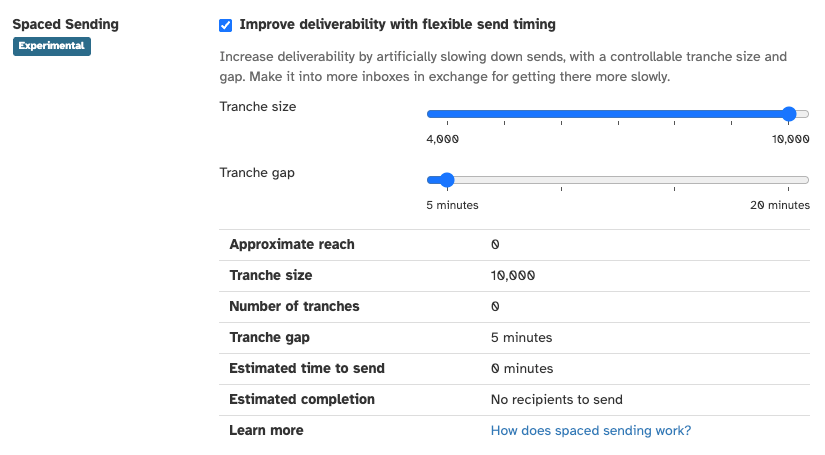
- Check Improve deliverability with flexible send timing.
- Select a Tranche size. A smaller tranche reduces the number of recipients sent at once but increases the total sending time.
- Select a Tranche gap. A longer gap increases the pause between tranches and the total sending time.
- Review the estimates, then save the message.
Understand the estimates
The estimates use the message’s approximate reach and a our typical send rate of 4,500 emails per minute.
- Approximate reach is the estimated number of recipients used for planning. The final count may change when AlumnIQ prepares the message.
- Number of tranches is the approximate reach divided across the selected tranche size.
- Estimated time to send is the time from the first send through the last send, including every tranche gap. Reminder: Send is not the same thing as delivery.
- Estimated completion is the time that AlumnIQ expects the last send to take place.
These are planning estimates. Runtime load can make the send finish later.
Change settings after scheduling
You can change the settings while the message is still editable. Once AlumnIQ starts preparing the delivery queue, the settings become read-only.
To change them after queue preparation begins, halt the message, edit the settings, and schedule it again. AlumnIQ creates a new tranche plan for recipients who have not already been sent the message. Previously sent recipients are not included again.
Users without permission to schedule messages can view saved Spaced Sending settings but cannot change them.